
How to File KRA Nil Returns in Kenya: Step-by-Step Guide
If you have a KRA PIN but did not earn any income during the year, you may still be required to file your annual KRA tax return.
The good news is that filing KRA Nil Returns is free, simple and can be done online through the KRA iTax portal. KRA also allows taxpayers to file Nil Returns using the KRA M-Service App.
In this blog, we explain how to file KRA Nil Returns step by step, who should file them, the deadline, what happens if you forget, and how to confirm that your return has been successfully submitted.
What Are KRA Nil Returns?
A KRA Nil Return is a tax return submitted by a taxpayer who has a KRA PIN with an applicable Income Tax obligation but has no income to declare for the relevant year.
Having no income does not automatically mean you are exempt from filing. KRA states that individuals with a KRA PIN and Income Tax obligation are required to file an annual return, even if they did not earn income during the year.
For example, you may need to file a Nil Return if you:
- Are unemployed but have a KRA PIN.
- Have not started working after obtaining your KRA PIN.
- Did not earn any income during the relevant year.
- Have a KRA PIN but did not operate a business.
- Had no taxable income to declare.
However, if you actually earned income from employment, business, freelancing, farming, online work or another source, you should not simply file a Nil Return. You may need to declare that income in the appropriate annual return. KRA specifically advises taxpayers with additional sources of income to declare them.
When Is the KRA Nil Return Deadline?
Individual Income Tax Returns are generally filed between 1 January and 30 June of the following year.
For example, KRA’s 2026 filing guidance states that returns for the 2025 year of income are filed from 1 January 2026 to 30 June 2026.
Therefore, taxpayers should avoid waiting until the last day to file their returns.
What You Need Before Filing
You don’t need to pay money to file a Nil Return.
Before you begin, make sure you have:
- Your KRA PIN.
- Your iTax password.
- Access to the email address registered with KRA, if required.
- A phone, tablet or computer with internet access.
If you have forgotten your iTax password, you can use the password-reset option on the KRA portal.
How to File KRA Nil Returns on iTax
Follow these steps to file your Nil Return online.
Step 1: Visit the KRA iTax Portal
Go to the official KRA iTax portal and log in using your KRA PIN and password.
KRA confirms that tax returns can be filed online through iTax.
Step 2: Go to the Returns Section
After logging in, look for the Returns option on your iTax dashboard.
Select File Return.
KRA’s own guidance confirms that taxpayers can access the Nil Return option from their iTax profile under the Returns section.
Step 3: Select the Appropriate Tax Obligation
Choose the relevant Income Tax obligation associated with your PIN.
The exact options displayed can depend on the obligations registered on your KRA account.
Step 4: Select the Nil Return Option
When prompted to select the type of return, choose the Nil Return option.
This is the important step that distinguishes a Nil Return from a normal income tax return.
Step 5: Select the Relevant Year
Choose the year of income for which you are filing.
For example, if you are filing the annual return during 2026 for the previous year and had no income during 2025, select the appropriate 2025 return period.
Always double-check the year before submitting.
Step 6: Submit the Return
Review the information displayed on the screen and submit the return.
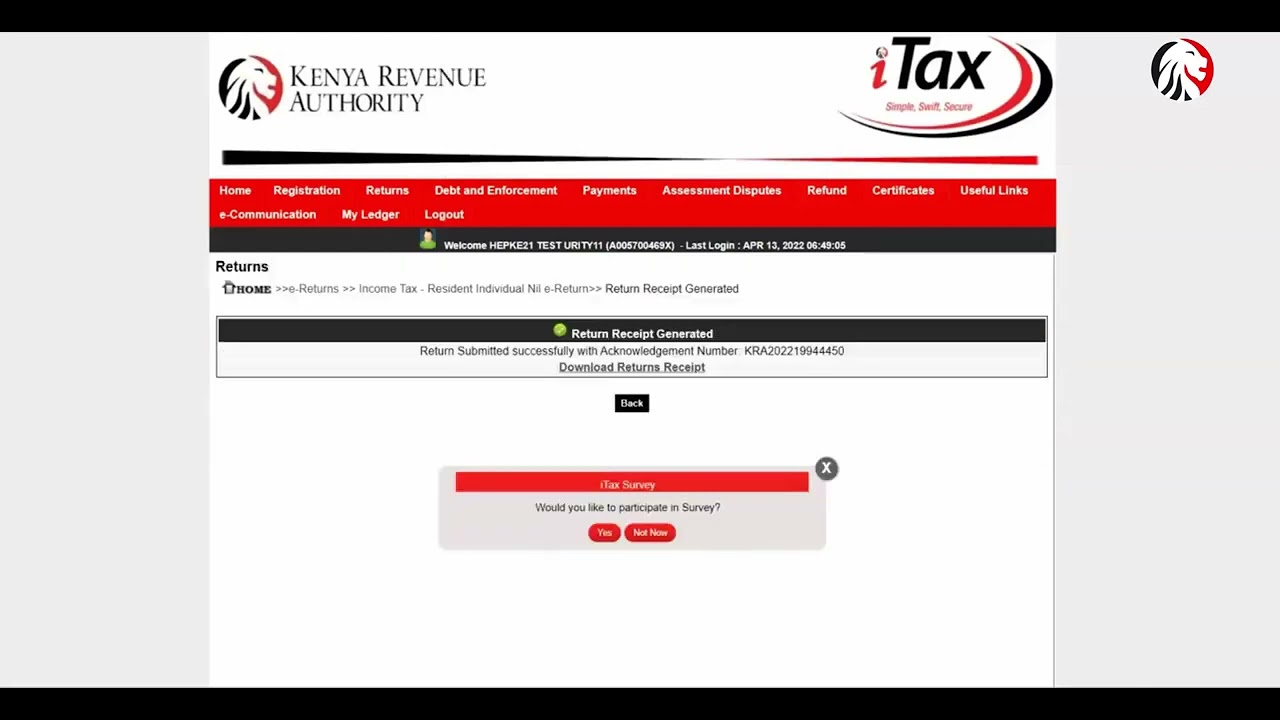
If the submission is successful, iTax should generate an acknowledgement receipt.
Make sure you save or download the acknowledgement receipt for your records.
How to File KRA Nil Returns Using the M-Service App
You don’t necessarily have to use a computer.
KRA’s M-Service App also supports Nil Return filing. The app is available through the major mobile app stores, and KRA describes it as a free service.
The app can also be used for other KRA services, including PIN registration, tax payments and verification services.
This makes it particularly convenient if you prefer filing your return using your smartphone.
Can You File a KRA Nil Return Using Your Phone?
Yes.
You can use the KRA M-Service App to file a Nil Return from your phone. KRA also provides USSD services through *572#, although the specific service available to you may depend on the tax service and your account.
For most people, iTax or the official KRA M-Service App will be the easiest option.
What Happens After Filing a Nil Return?
Once your return has been successfully submitted, keep the acknowledgement receipt.
You can also check your filing history through your iTax account.
KRA states that taxpayers can view previously filed returns by logging into iTax, selecting the Returns section and consulting the relevant return.
Keeping your filing records can be useful when applying for services that require evidence of tax compliance.
What Happens If You Don’t File Your Nil Return?
Failing to file a required tax return by the deadline can result in penalties.
KRA’s taxpayer guidance states that individual income tax returns are due by 30 June of the following year and provides penalties for late filing.
This is why having no income should not be taken to mean that you can ignore your KRA filing obligation.
If you have a KRA PIN and are unsure whether you are required to file, it is better to check your registered tax obligations and obtain guidance from KRA.
Can You File a Nil Return After the Deadline?
If you missed the deadline, you should still file the outstanding return rather than leaving it unfiled.
Late filing may attract a penalty, depending on the applicable tax obligation and circumstances.
If iTax prevents you from filing because previous returns are missing, KRA advises taxpayers to file the outstanding returns before attempting to file the current return.
Common Questions About KRA Nil Returns
Do I have to file a KRA return if I am unemployed?
If you have a KRA PIN with an Income Tax obligation and have no income to declare, KRA says you should file a Nil Return.
Is filing a KRA Nil Return free?
Yes. Filing the return itself does not require you to make a tax payment when there is no tax due.
Can I file a Nil Return from my phone?
Yes. KRA’s M-Service App supports Nil Return filing.
Do I need a P9 to file a Nil Return?
If you genuinely have no employment income to declare, you generally do not file an employment-income return using a P9. Instead, you use the Nil Return option where applicable.
What if I earned money from an online job?
Do not automatically file a Nil Return simply because you are unemployed or don’t have a traditional job.
KRA’s current filing guidance says taxpayers with additional income such as freelancing, consultancy, online services, farming or other income-generating activities should declare that income in their annual return.
Can I correct a mistake after filing?
Yes. KRA states that taxpayers can correct errors by filing an amended return.
Important Tips Before Filing
Before clicking submit, remember these simple tips:
1. Make sure you are filing for the correct year.
Choosing the wrong year can create unnecessary problems.
2. Don’t file Nil if you actually earned income.
If you received income from employment, business, online work, consultancy or another source, determine the appropriate return instead.
3. Keep your acknowledgement receipt.
It is proof that you submitted the return.
4. Don’t wait until the deadline.
iTax traffic and technical issues can become frustrating when many taxpayers wait until the last minute.
5. Check your tax obligations.
Your KRA PIN can have more than one tax obligation, and each obligation can have its own filing requirements.
KRA Nil Returns Made Simple
Filing KRA Nil Returns is one of those tasks that can take only a few minutes but is easy to forget.
If you have a KRA PIN with an Income Tax obligation and had no income to declare, don’t assume that you are automatically exempt from filing. KRA requires eligible taxpayers to submit annual returns even when they have no income, in which case a Nil Return is appropriate.
The easiest approach is to log into iTax, go to Returns → File Return, select the appropriate Nil Return option, choose the relevant year and submit.
For official guidance, you can also use KRA’s dedicated Nil Returns tutorial and File My Returns page.
Key Takeaways
- A KRA PIN does not mean you can ignore annual filing obligations.
- If you have no income to declare, you may need to file a Nil Return.
- Nil Returns can be filed through KRA iTax.
- KRA’s M-Service App also supports Nil Return filing.
- Individual annual returns are generally due by 30 June of the following year.
- Always save your acknowledgement receipt after successful filing.
- If you earned income, don’t incorrectly file a Nil Return just to avoid declaring it.
- Filing on time helps you avoid unnecessary penalties and compliance problems.